7/9/2025 | 9 Minute Read
Topics:

Hybrid cloud backup is quickly becoming the gold standard in business continuity and disaster recovery (BCDR). By combining the strengths of local and cloud storage, hybrid solutions ensure that IT service providers can offer faster recovery, stronger cybersecurity resilience, and simplified management and compliance across environments.
It’s no surprise that businesses are embracing hybrid cloud backup, considering the intense pressure to safeguard data from today’s frequent and sophisticated cybersecurity threats and attacks. As bad actors evolve, so must our defenses, which means adopting the latest infrastructure advancements to meet changing cybersecurity threats.
Below, we break down how hybrid cloud backup works, why it outperforms public or private-only backups, and how to leverage x360Recover from Axcient™, a ConnectWise company, to move beyond traditional backup methods.
Hybrid cloud backup is a modern data protection strategy that combines the speed of on-premises backups with the scalability and reliability of cloud-based storage. Unlike traditional backup methods that depend entirely on a single location, hybrid backup aligns with today’s distributed IT environments. Whether data lives in physical offices, virtual machines, or the cloud, hybrid backup delivers complete data protection and recoverability.
It works by creating two synchronized copies of critical data:
See if hybrid backup is for you: Download the 2025 Hybrid Cloud Backup Essentials >>
Unlike cloud-only or local-only backup strategies, hybrid cloud backup reduces the risk of data loss and the complexity of relying solely on internet-based restores. Not only does this environment offer a flexible way to meet diverse infrastructure needs, but it streamlines BCDR management for consistent service levels. Most critically, hybrid cloud backup guarantees that critical data is accessible even if one location, local or cloud, becomes unavailable.
Hybrid cloud backup bridges the gap left by single-solution backup.
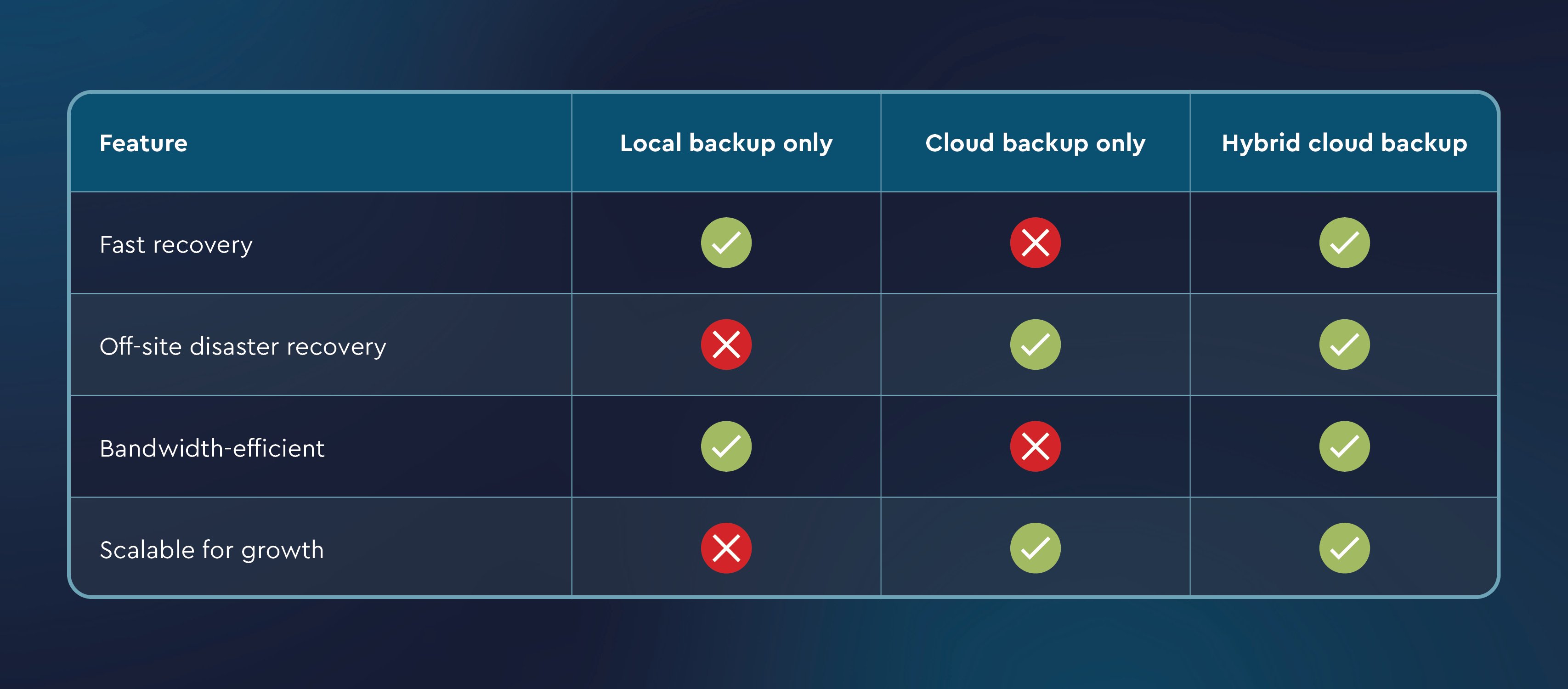
Hybrid cloud backup offers a powerful combination of performance, reliability, and scalability. Here’s how it can benefit your business:
When constructing a hybrid cloud BCDR environment, you have two primary cloud options to weigh:
The best-fit approach depends on factors such as the current IT infrastructure, security requirements, industry regulations, and data sensitivity. In many cases, especially when private cloud resources are limited, public cloud services provide a flexible way to efficiently layer data protection. This layered visibility enhances control over how data is stored, monitored, and protected, supporting stronger continuity and faster recovery.
When implementing a hybrid or public cloud-based solution, it’s important for businesses to evaluate how each component of the environment aligns with business demands and risk tolerance. Important layers to assess include:
Rolling out hybrid cloud solutions doesn’t have to be complex, especially when working with a vendor that understands your operations. When managing dozens or hundreds of endpoints, solutions that streamline deployment and monitoring through a centralized dashboard will drastically reduce operational overhead. The key to successful implementation lies in the following:
Axcient, a ConnectWise company, empowers IT providers with x360Recover, a powerful and flexible BCDR solution designed to protect data across both on-premises and cloud environments. With options for appliance-based or cloud-only deployment, businesses can tailor data protection strategies to fit their unique needs, all from a unified platform. Here’s how:
Streamlined management: A centralized platform with single sign-on provides an intuitive interface for managing backups, recovery, and continuity across diverse environments. By consolidating tasks into one system, you reduce overhead and eliminate the need to juggle multiple tools.
Direct-to-cloud protection: By backing up data straight to the cloud, without relying on local appliances, businesses minimize the need for on-site hardware, lower operational costs, and simplify support of remote or distributed endpoints.
Fast cloud-based failover: When local systems go down, cloud failover capabilities, such as pre-configured runbooks using Virtual Office, enable rapid recovery, ensuring business continuity even in the face of severe outages.
Automated replication: Automating the process of syncing backups between local and cloud environments protects current and available backups across the hybrid cloud infrastructure, eliminating the need for manual effort and minimizing the risk of discrepancies.
Geo-redundancy: To further safeguard customer data, Axcient offers Geo+, which replicates backups across geographically separated cloud data centers. This adds another layer of protection against regional disasters, ensuring data availability even if one cloud region experiences an outage.
Flexible scalability: x360Recover adapts to business growth by combining the affordability of public cloud services with the control and security of private cloud options. You can easily scale resources with pooled storage at a flat fee, ensuring long-term performance and value as your demands evolve.
Whether you manage customer environments as a managed service provider (MSP), or oversee in-house infrastructure as an IT leader, hybrid cloud backup has evolved into a must-have strategy for modern, resilient, and scalable data protection. With the right solution in place, you can deliver faster recovery, stronger security, and greater flexibility while reducing operational overhead and improving data protection outcomes.
Download the 2025 Hybrid Cloud Backup Essentials eBook to get a deeper look at hybrid backup best practices, solution features to prioritize, and how to position hybrid cloud for internal success. Whether you’re refining your current strategy or building a new one, this guide will help you in 2025 and beyond.
And if you’re not familiar with ConnectWise and x360Recover, start your free 14-day trial today to see how efficient and effective hybrid cloud backups can be.
Share:



Hybrid cloud backup stores data both locally and in the cloud to ensure fast recovery and off-site protection in case of disasters.
It offers faster restore times using local copies while keeping redundant, immutable backups in the cloud for resilience.
MSPs use hybrid cloud backup to secure their clients’ data. IT departments use hybrid cloud backup to secure their business data. Both use hybrid cloud to meet recovery SLAs, defend against ransomware, and simplify compliance with a mix of on-prem and cloud storage.
Yes, it can scale with your needs by expanding cloud storage while maintaining local recovery for speed.





