



x360Recover AutoVerify
Automatic backup verification software
Save valuable technician time and provide documented recovery readiness for compliance, cyber insurance, and business continuity. AutoVerify in Axcient x360Recover™ from ConnectWise automatically validates every backup by testing recovery points for bootability and integrity.
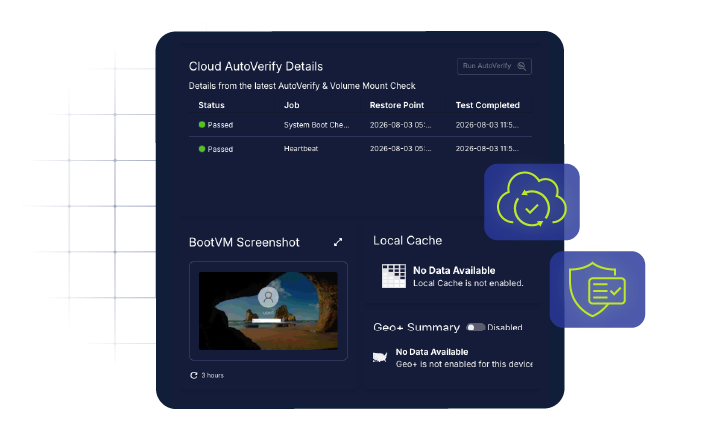
Always-on backup verification
Continuously validate backup integrity without manual technician oversight. It automatically tests Windows OS recovery points across both direct-to-cloud and appliance-based deployments to verify they're bootable, free from corruption, and ready to restore. Plus, it’s enabled by default at no additional cost.
With AutoVerify you can:
- Automatically verify backup recoverability with no manual intervention
- Detect corruption before it impacts disaster recovery
- Reduce technician time spent performing backup validation
- Demonstrate recovery readiness for audits, compliance, and cyber insurance
- Gain confidence that backups are ready when you need them most

How does AutoVerify work?
A tiered testing strategy prioritizes “lighter” tests, which are performed more frequently than “heavier” tests. Testing procedures include:
- Boot testing with screenshot capture to check operating health and system readiness.
- Heartbeat checks to confirm that services are running correctly on the virtual machine (VM).
- Microsoft Volume Shadowcopy Services (VSS) validation to ensure application consistency.
- Deep check disk (CHKDSK) scans on appliance-based backups across all data volumes to detect corruption.

Self-healing backup verification
Go beyond simply identifying backup issues. For appliance-based x360Recover deployments, AutoVerify automatically performs self-healing backup verification by running CHKDSK against protected Windows volumes to detect and repair filesystem issues. Proactive alerts and predefined escalation workflows help teams resolve many backup integrity issues, reducing manual interventions.

Built for MSPs and IT departments
Simplify disaster recovery readiness whether you're managing hundreds of customer environments or protecting your own infrastructure.
For MSPs
- Demonstrate service quality with documented proof of backup testing
- Support client compliance and cyber insurance requirements
- Reduce time spent on manual backup validation
For departments
- Reduce operational risk with continuous backup verification
- Improve disaster recovery readiness across the organization
- Scale backup testing without increasing administrative effort
Frequently Asked Questions (FAQs)
What is AutoVerify?
AutoVerify is an automated backup integrity testing feature built into Axcient x360Recover™ from ConnectWise that validates recovery points for bootability, corruption, and recoverability without manual intervention.
Does AutoVerify require additional licensing?
No. AutoVerify is enabled by default at no additional cost for both direct-to-cloud and appliance-based x360Recover deployments.
What does AutoVerify test?
AutoVerify performs boot testing, heartbeat monitoring, Microsoft VSS validation, and scheduled CHKDSK scans to verify backup integrity and recoverability.
What happens if AutoVerify finds a problem?
AutoVerify automatically follows predefined escalation rules to notify technicians only when action is required. Appliance-based deployments also include self-healing backup verification to help resolve filesystem issues automatically.
Can AutoVerify help with compliance?
Yes. AutoVerify provides documented proof of backup validation to support audits, cyber insurance requirements, regulatory compliance, and customer reporting.