





See what a co-managed backup solution can do for you
Out-of-the-box scripts. Around-the-clock monitoring. Unmatched automation capabilities. Start doing more with less and exceed service delivery expectations.
Streamline backup management
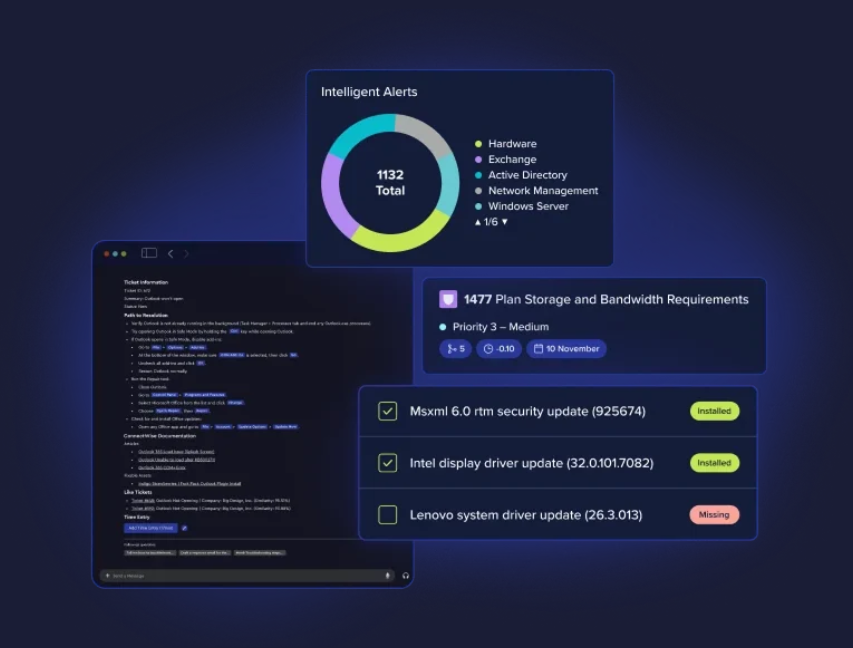
Stop managing multiple backup vendor portals and get a single, integrated view across multiple clients. Get at-a-glance visibility into on-prem, cloud, and SaaS workloads.

Understand backup health
Get a holistic view of all integrated backups in one place. Spot anomalies and trends, monitor unprotected assets, and manage risk more effectively.
Do more with NOC support
Save the time and cost of hiring a tech with backup support skills. Our certified NOC* techs take day-to-day tasks off your plate while increasing security.
*The NOC add-on service is available for select vendors.

Unified Interface for Management
One solution for all backup needs
Every MSP business is unique, and so are its clients. With support for the industry leading backup solutions, ConnectWise can help address every need for business continuity and disaster recovery (BCDR).

Round-the-Clock Monitoring
Get back your nights and weekends
Backup solutions are noisy. Ensure your clients are always protected with a team of trained technicians who monitor and respond to alerts raised from your backup solutions. Our techs are available 24/7 and ready to quickly resolve issues in nightly backup runs, which means you can sleep peacefully.

Always Prepared
Automate your disaster recovery plan
Your backups are your insurance and your last wall of defense when everything else fails. However, it is key to have a plan and keep it tested and updated. With DR runbook automation, you can improve your testing scope and ensure that your clients’ data is protected and recoverable.
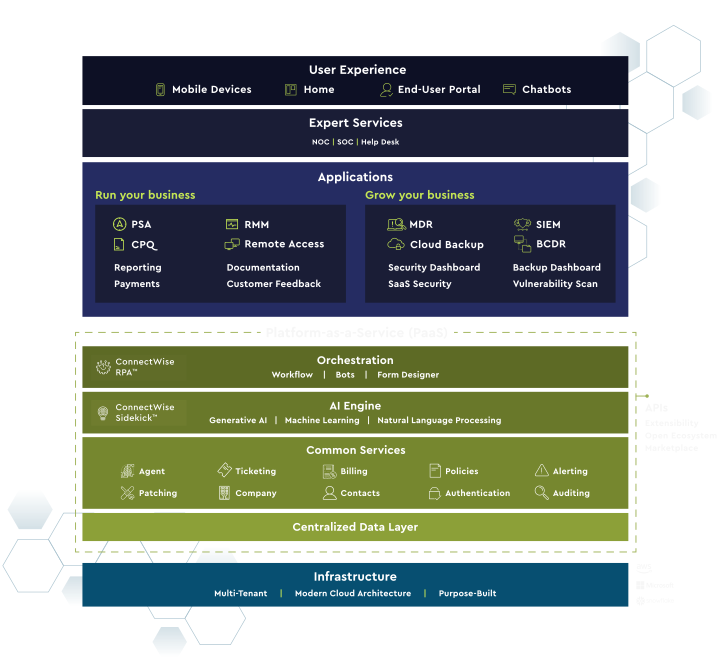
Purpose-Built
The first true MSP platform
Asio is the only platform purpose-built for MSPs. Generative AI and automation are only limited by your imagination when your solutions share a common data layer. Discover next-gen hyperautomation that will carry your business farther and faster with customer satisfaction levels that can push you ahead of the curve in a competitive landscape.


Features you'll love
Express client onboarding
Re-usable policies define the configurations required, and Asio helps install the backup agent, create a protection plan, and protect your new clients’ endpoints within minutes and with relative ease.

Unified interface to manage backups
A centralized console means you can view backup status of all devices, receive alerts for any backup issues generated, action on tickets opened for backup issues, access devices that need remediation, and update the configurations on the backup solution portal.
Review backups DR readiness
Easily view the outcomes of every backup validation task status, and action any failures to eliminate recovery risk.
Industry-leading expert services
Drive better outcomes by handing off your key backup tasks and actions to the 24/7 NOC team, who can ensure that you deliver the best services for your clients.
Be prepared for every disaster
Ensure recoverability with preparation. The DR runbooks feature Asio helps ensure you have a tested plan for recovery of your client’s business data in the event of a disaster or cyberattack.
Leverage features of Asio®
Since it’s built natively on our Asio platform, you can leverage its unifying power to simplify your entire backup service management experience and increase productivity.
Related Products
Frequently Asked Questions (FAQ)
Which third‑party backup tools are supported in the co‑managed backup interface, and how do we onboard new vendors?
The console supports leading data protection tools, such as Acronis, Axcient, Datto, and Veeam, with connectors that can be enabled in the ConnectWise platform. To learn more about the current providers supported and functionality, check the Backup Dashboard and add vendors as needed by authorizing the integration.
What day‑to‑day tasks does the NOC‑supported co‑managed backup service take over, and how do 24/7 escalations work?
Our 24/7 ConnectWise NOC Services handles day-to-day tasks such as daily monitoring, failure remediation, ticket creation, and after‑hours response. Escalations follow your runbook (impact, approval thresholds, contacts) so urgent issues reach the right engineer, regardless of time of day.
How does DR runbook automation validate disaster recovery readiness and document test results for audits?
Automated workflows schedule verification jobs, test restores, and DR exercises, then publish time‑stamped reports with pass/fail and evidence. These results can be stored alongside your client runbooks for compliance.
What’s included in express client onboarding for co‑managed backup, and how quickly can we standardize policies?
A guided setup imports assets, discovers unprotected systems, maps them to policies, and enables alerts. Most partners standardize backup windows and retention on day one, then tune exceptions per client.
How does the backup health dashboard surface unprotected assets and anomaly trends, and can we trigger remediation directly from the ConnectWise Platform?
Health views can highlight gaps, such as unprotected devices, aging snapshots, repeated job failures, as well as anomaly spikes. From those views, you can pivot to the relevant tool or workflow to remediate and track closure.
How is the NOC add‑on billed within co‑managed backup when only select vendors are supported?
NOC services are typical per protected asset or workload, with availability by vendor. Your sales representative will quote the exact model for your mix of tools.
Your search is over
Instead of endless scrolling, why not get your questions answered by a live person?