6/18/2026 | 2 Minute Read

As organizations continue to generate and store more cloud data than ever before, managing that data effectively has become just as important as protecting it. That’s why ConnectWise is introducing retention policies in x360Cloud to provide greater flexibility to align backup data management with data retention requirements while maintaining the strong data protection they rely on.
This enhancement empowers partners to automatically manage historical backup data according to defined retention periods, simplifying compliance efforts, improving operational efficiency, and optimizing storage utilization.
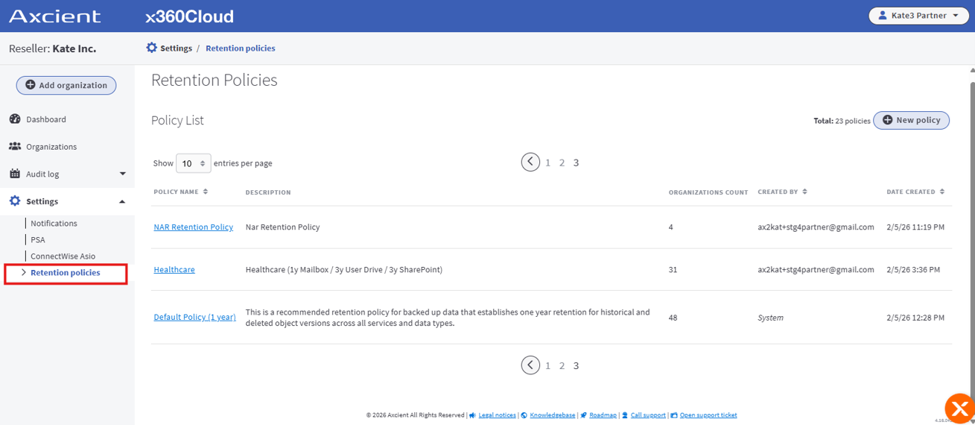 Figure 1: Retention policies page in x360Cloud
Historically, x360Cloud retained backup data indefinitely. While this approach ensured comprehensive data protection, some organizations required more flexibility to address regulatory requirements, contractual obligations, storage management goals, or internal governance policies.
The new retention policies feature addresses those needs by enabling automatic removal of backup data that exceeds a defined retention period. This allows partners to establish consistent data lifecycle management practices across environments while preserving the latest versions of protected data.
Importantly, retention policies only apply to non-current data, such as historical versions and items that have been deleted from the source platform. Current data remains protected and available.
The introduction of retention policies delivers several meaningful benefits:
Simplified compliance
Many organizations must comply with industry regulations, contractual requirements, or internal governance policies that dictate how long data can be retained. Retention policies help consistently enforce those requirements across environments.
Improved storage efficiency
By automatically removing aged backup data that is no longer required, organizations can better manage storage growth and align with guidelines.
Enhanced performance
Reducing unnecessary historical data can help improve the efficiency of backup searches and restore operations, allowing quicker access to the information.
Reduced administrative overhead
Automated policy enforcement minimizes manual intervention and helps standardize data retention practices across multiple environments.
A flexible and straightforward experience
The retention policy workflow was designed with simplicity in mind. Partners can choose from a default one-year retention policy or create custom policies tailored to specific requirements. Policies can then be assigned to one or more organizations and updated as business needs evolve.
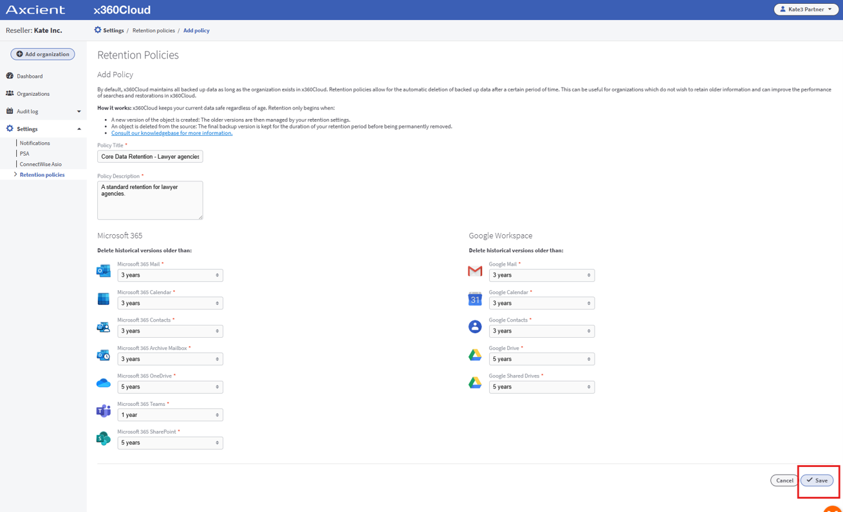
Figure 2: Add policy page in x360Cloud
This flexible approach allows a balance of compliance requirements, operational efficiency, and expectations while maintaining confidence that protected data is managed appropriately throughout its lifecycle.
Get started with instructions on configuring retention policies in ConnectWise University™.
Retention policies are available to all x360Cloud partners across all supported regions. New organizations will require an assigned retention policy, while partners maintain control over how and when policies are created and applied to their managed environments.
Deliver stronger cloud data protection with less effort
Try x360Cloud free for 14 days and see how automated backup, rapid recovery, and new retention policy controls can help you simplify management, support compliance initiatives, and provide greater value.
Share:


Retention policies allow partners to automatically remove historical backup data after a defined retention period. This helps organizations align backup data management with compliance requirements, governance policies, and storage management goals.
Retention policies apply only to non-current backup data, including historical versions and items that have been deleted from Microsoft 365® or Google Workspace™. Active, current data remains protected and available.
No. Retention policies only manage backup data stored in x360Cloud and do not affect active production data within Microsoft 365 or Google Workspace.
Yes. Partners can use the default one-year retention policy or create custom retention policies that align with specific business, contractual, or regulatory requirements.
Yes. Retention policies can be assigned to one or more organizations, allowing partners to tailor data retention practices based on individual customer needs.
Axcient x360Cloud™ from ConnectWise is a cloud-to-cloud backup and recovery solution designed to protect Microsoft 365 and Google Workspace data. It helps safeguard critical business information, including email, calendars, contacts, OneDrive, SharePoint, Teams, Gmail, Google Drive, and more.
x360Cloud provides automated backup, powerful search capabilities, granular restore options, compliance-focused security features, and centralized management through a simple and scalable platform.
With data securely backed up to the Axcient Cloud, our partners can be confident that information remains protected against accidental deletion, ransomware, malicious activity, and other common causes of data loss.
x360Cloud delivers a comprehensive set of capabilities that help protect environments while reducing administrative burden.
Key advantages include:
Together, these capabilities deliver business continuity services that are secure, scalable, and easy to manage.





